

Track Every Entitlement. Simplify Every Member Visit.

Help teams understand what is included, what has been used and what remains through a clearer entitlementand usage workflow.

Membership Plan
icon
Define Benefits
icon
Check Eligibility
icon
Member Access
icon
Benefit Usage
icon
Usage Record
icon
Reconciliation.
blog image
Fitness & Wellness

Track included sessions, package credits and eligible visits.

blog image
Clubs & Resorts

Organize guest passes, complimentary visits and facility allowances.

blog image
Associations & Community

Manage eligible training credits, event allowances and member services.

blog image
Timeshare & Vacation Rentals

Relate allocated stays, included nights and owner usage to the relevant records;

CHALLENGES & SOLUTIONS

Make every membership benefit count.

Help members understand what they receive, while giving your team a clearer way to manage benefits and privileges.

Unclear Member Benefits

Present included services, privileges and eligible perks in line with membership or package terms.

Inconsistent Benefit Delivery

Give teams a clearer reference for membership details and agreed benefit fulfillment.

Scattered Benefit Records

Keep relevant membership and package information organized in a connected workflow.

Different Owner & Guest Privileges

Clarify eligibility for owners, members and guests so the right benefits reach the right audience.

Product Experience

Give your team a clearer view of what is included and used.

Bring membership, package and booking context together to help staff answer entitlement questions more consistently.
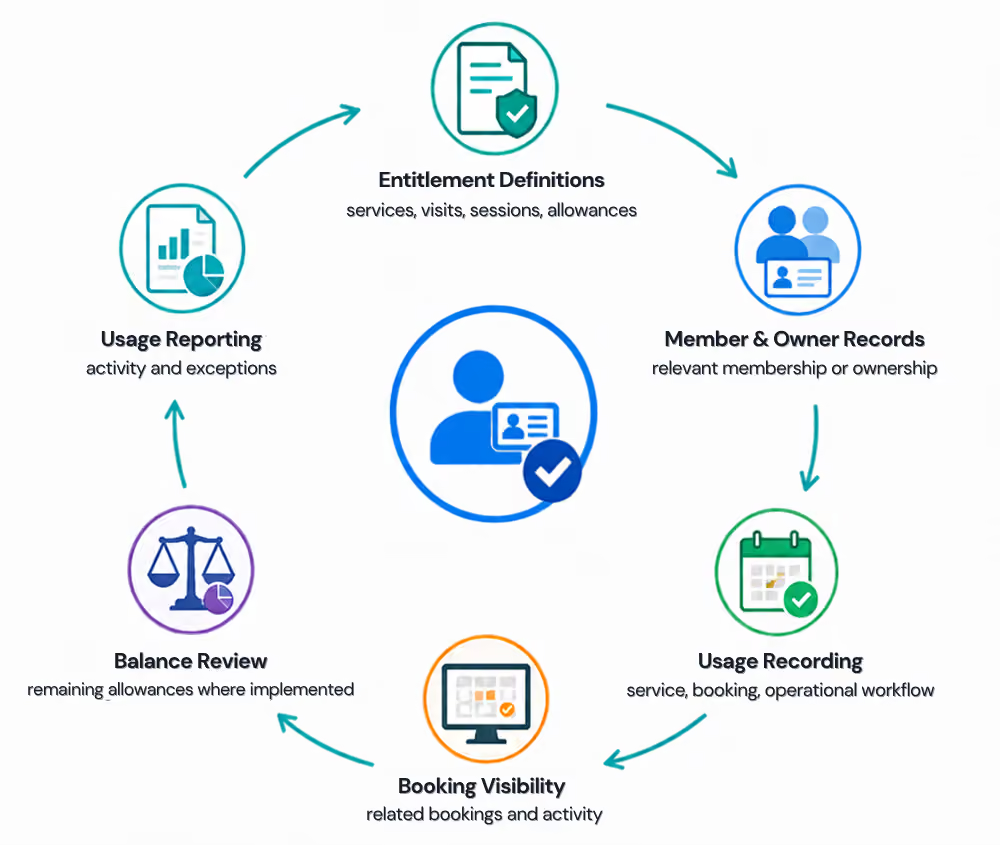
Key Capabilities
A circular flowchart illustrating a service and membership management process. The center icon shows a person with an ID card and a checkmark. Surrounding it clockwise are six icons with descriptions: Entitlement Definitions (services, visits, sessions, allowances), Member & Owner Records (relevant membership or ownership), Usage Recording (service, booking, operational workflow), Booking Visibility (related bookings and activity), Balance Review (remaining allowances where implemented), and Usage Reporting (activity and exceptions). Arrows connect the icons in a continuous circle.
icon
Entitlement Definitions
Document included services, visits, sessions or allowances.
icon
Member & Owner Records
Associate the entitlement with the relevant membership or ownership context.
icon
Usage Recording
Record usage through the configured service, booking or operational workflow.
icon
Booking Visibility
Review related bookings and activity where available.
icon
Balance Review
Show remaining allowances only where the relevant calculation is implemented.
icon
Usage Reporting
KeepReview recorded activity and exceptions to support operational decisions. relevant membership and activity records available for review.

Membership Entitlements & Usage Tracking FAQs

Plus Icon
Can Membroz track allocated stay nights automatically?
Plus Icon
Can staff review remaining fitness sessions?
Plus Icon
Can guest passes be tracked?
Plus Icon
Can entitlements vary by owner agreement?
Plus Icon
Can usage be reported?