




Member

Payment Request
Payment
Receipt
Member Record
Reconciliation
Conversation operations
Connect the counter to the customer.
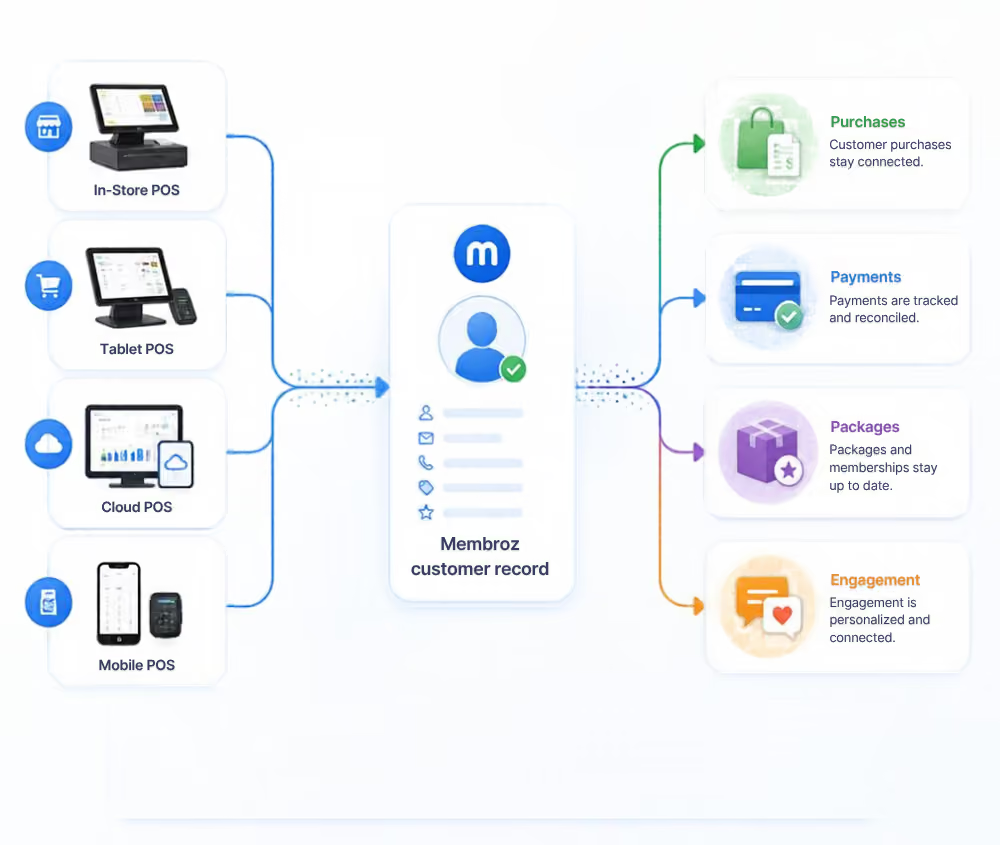
 POS transaction sync
- Customer identification
- Payment synchronization
- Purchase history
- Connected customer records
Product Experience
Connect Member Engagement with Every Sale
Bring supported point-of-sale transactions into your membership workflows to help connect purchases, member benefits and business insights.
Key Capabilities
Bring point-of-sale payments into Membroz
Connect POS systems with customer, membership and payment data so in-person purchases become part of the complete customer journey.


POS synchronization
Bring supportedpoint-of-sale transactions into the Membroz platform.
Customer-linked sales
Connect purchases to theright customer or member record.
Package purchases
Sync package sales andpurchased value with customer records.
Outlet transactions
Connect transactions fromrestaurants, cafés, spas and other outlets.
Payment history
Keep POS paymentactivity visible alongside the customer's wider history.
Related Capabilities
Explore other platform capabilities
Every Membroz module is more powerful when connected to the rest of the platform.


POS Integration FAQ

Can Membroz integrate with an existing POS system?
Can POS sales be linked to member accounts?
Can POS transactions be synchronized with Membroz?
Can I connect POS sales with membership packages or benefits?
Can POS data be used for reporting?


