




Member Activity

Membroz
Integration
Data Sync
Business Action
Member Record
Conversation operations
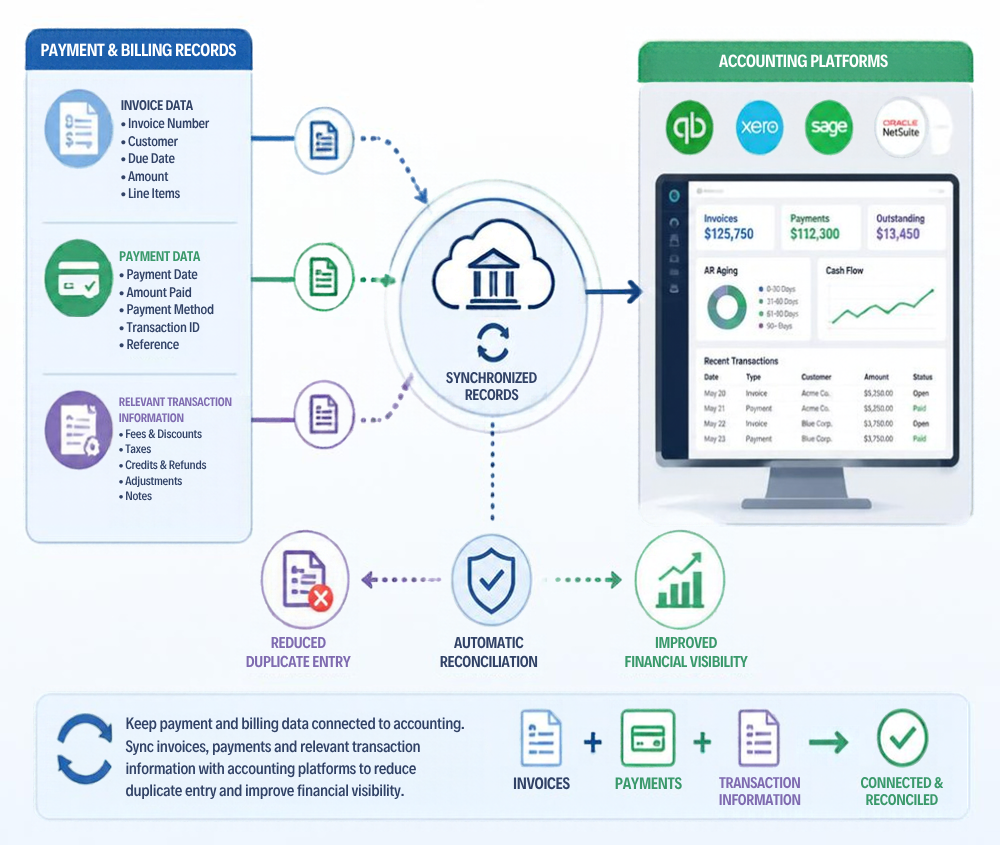
Move from payment records to accounting records.
 Invoice synchronization
- Payment synchronization
- Accounting records
- Reduced duplicate entry
- Finance review
Product Experience
Keep payments and accounting in sync
Connect payment activity with your accounting system so invoices, receipts, settlements and financial records stay aligned.
Key Capabilities


QuickBooks
Connect relevant Membrozbilling and payment records with QuickBooks workflows.
Xero
Connect relevant Membrozbilling and payment records with Xero workflows.
Tally
Connect relevantMembroz billing and payment records with Tally workflows.
Invoice synchronization
Keep invoice informationaligned between Membroz and the accounting workflow.
Payment synchronization
Keep payment recordsconnected so finance teams reduce duplicate entry.
Related Capabilities
Explore other platform capabilities
Every Membroz module is more powerful when connected to the rest of the platform.


Accounting Integration FAQ

Can Membroz integrate with accounting software?
Can I synchronize invoices and payments with my accounting system?
Does Membroz support QuickBooks?
Can accounting integrations reduce manual bookkeeping?
Can I choose which financial data is synchronized?


